Mortar Consent is self-hosted cookie consent for WordPress: opt-in by default, with “Reject all” beside “Accept all”, choices by category that visitors can change at any time, and no calls to third-party services. This page is for developers setting it up. For what it does, see the Consent page.
Requirements
- WordPress 6.5 or later, tested up to 7.1.
- PHP 8.2 or later.
- Multisite is supported: each site has its own settings and consent log.
Installation
From a release zip: upload mortar-consent-<version>.zip under Plugins → Add New → Upload Plugin.
As a must-use plugin, for example in a Bedrock site that tracks it as a Git submodule or Composer path package, place it at mu-plugins/mortar-consent/ and add a loader, mu-plugins/mortar-consent.php:
<?php
/**
 * Plugin Name: Mortar Consent
 */

use MortarDigital\Consent\WordPress\Plugin;

// Composer's autoloader provides the classes. Pass the MU paths explicitly,
// because a symlinked package would otherwise resolve to its real location.
if (class_exists(Plugin::class)) {
    Plugin::boot(WPMU_PLUGIN_DIR . '/mortar-consent', WPMU_PLUGIN_URL . '/mortar-consent');
    require_once WPMU_PLUGIN_DIR . '/mortar-consent/functions.php';
}
Without Composer, require WPMU_PLUGIN_DIR . '/mortar-consent/mortar-consent.php'; is enough: the main file has its own autoloader. If the plugin is loaded both ways, the regular copy stays inactive and shows a notice. Only assets/ and blocks/ need to be reachable over HTTP.
First steps
- Under Categories & cookies, list the cookies your site sets.
- Under Scripts, add the handles of the tracking scripts that need consent.
- Set your cookie policy link, and add the Cookie declaration block to your cookie policy page.
- Visit the site in a private window and test accepting, rejecting and changing your choice. Check the browser’s developer tools to confirm that no optional cookies or requests happen before consent.
Configuration
Settings come from three layers, with later ones winning:
- Defaults: translated wording and four categories (necessary, functional, analytics, marketing).
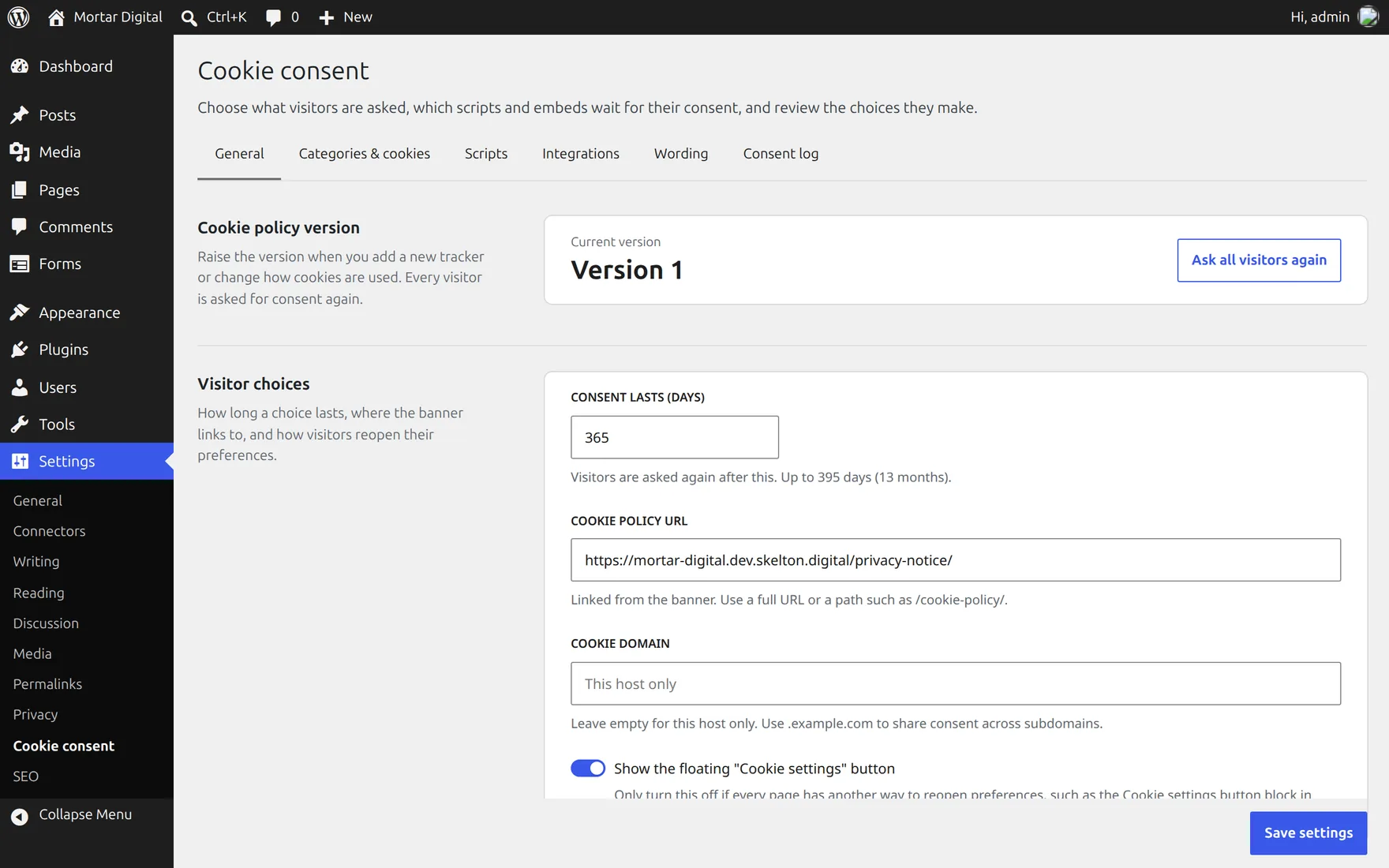
- Settings → Cookie consent: categories and cookies, gated scripts, integrations, wording, the policy version and the log. It needs
manage_options, which themortar_consent_capabilityfilter can change. - Code overrides: any key returned from
mortar_consent_overrideswins, and the settings screen shows it read-only. Values saved earlier come back if the override is removed.
add_filter('mortar_consent_overrides', fn (): array => [
    // Script handles to gate. Dependants of a gated handle are gated too.
    'scripts' => [
        'google-analytics' => 'analytics',
        'meta-pixel' => ['marketing'],
    ],
]);
mortar_consent_config runs last on the merged array as an escape hatch; the settings screen does not reflect changes made there. The settings screen stores only values that differ from the defaults, so untouched categories and wording keep following translations.
| Key | Default | Notes |
|---|---|---|
policy_version | 1 | Positive integer. Raising it asks every visitor again. |
lifetime_days | 365 | 1–395. Visitors are asked again after this. |
categories | necessary, functional, analytics, marketing | Each has id, label, description, required and cookies. A cookie is a name or {name, provider, purpose, duration}; a trailing * matches a prefix. |
scripts | [] | Script handle → category id, or a list of ids (all are required). |
texts | English wording | Every key in Config::TEXT_KEYS, as plain text. |
privacy_policy_url | the WordPress privacy page | An http(s) URL or a site-relative path. |
cookie_domain | this host only | For example .example.com to share consent across subdomains. |
reopen_button | true | The floating “Cookie settings” button. Turn it off when the theme links to #cookie-settings instead. |
log_enabled | true | Keep the consent log. |
log_retention_days | 1095 | 30–3650. A daily cron job deletes older records. |
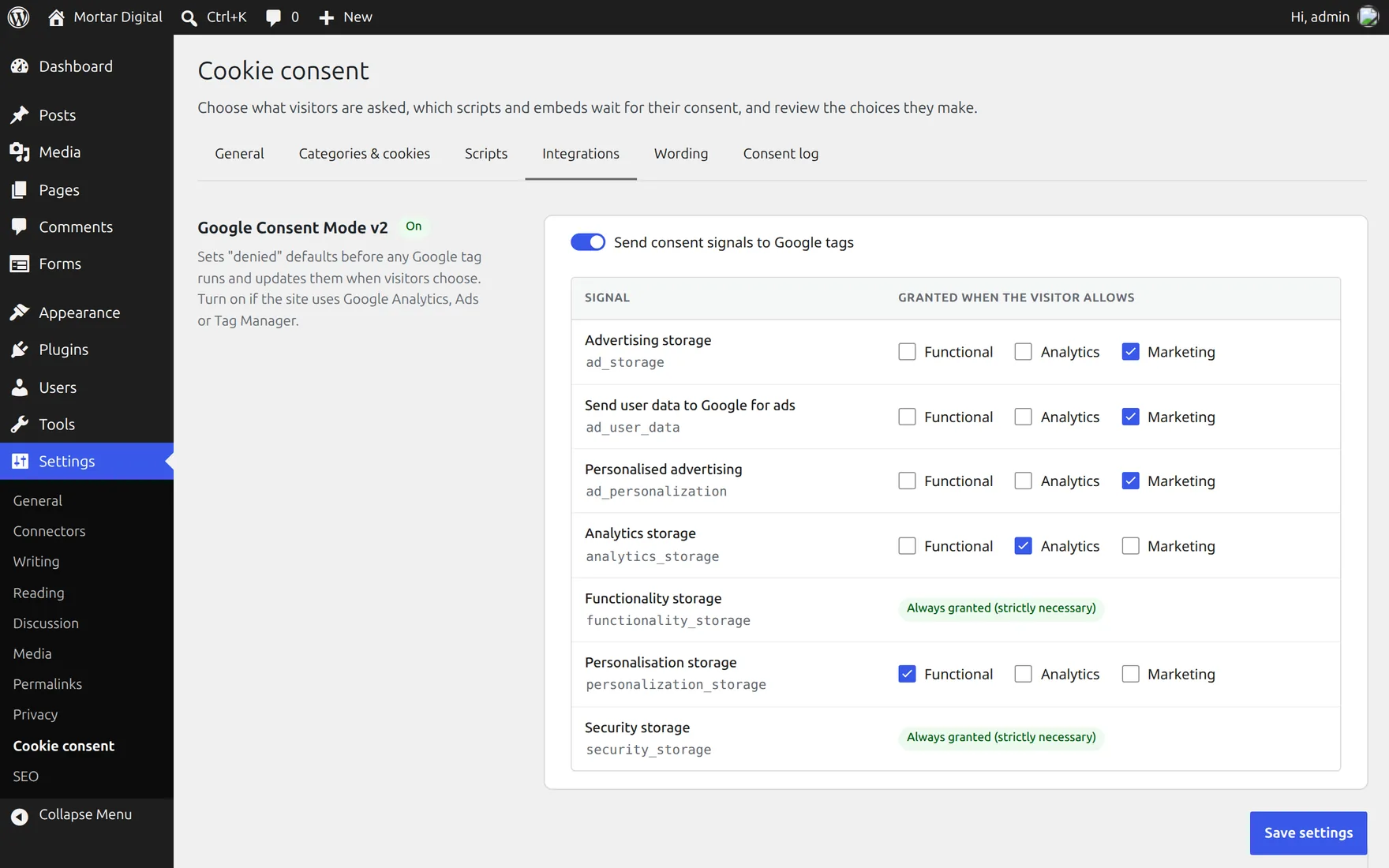
consent_mode | off, standard mapping | enabled, plus signals: Consent Mode v2 signal → category ids. |
embeds | category: functional | The category third-party embeds need; "" loads them freely. providers overrides it per provider slug, such as youtube or other. |
gpc_categories | ['marketing'] | Categories “Accept all” leaves off when the browser sends Global Privacy Control. |
wp_consent_api | standard mapping | WP Consent API category → category ids. |
Configuration is validated strictly. If it is invalid, a warning is logged and the defaults are used. Every handle the bad configuration tried to gate stays gated and needs all optional categories, so a typo cannot let a tracker through.
Gating scripts
Registered scripts: map the handle under scripts, as above. Inline before/after scripts and translations attached to the handle are gated with it. In the page source, a registered script’s tag has an id of handle-js.
Hand-written tags: use type="text/plain" plus the categories. Put the real type in data-mortar-consent-type, for example module:
<script type="text/plain" data-mortar-consent="analytics" src="https://example.com/tracker.js"></script>
<script type="text/plain" data-mortar-consent="analytics marketing">/* needs both */</script>
The runtime activates these in document order once consent is given. When a visitor withdraws a category they had allowed, the page reloads, because scripts that have already run cannot be unloaded, and known cookies in the withdrawn categories are deleted. Trackers that another script inserts later need that script to be gated.
Embedded content
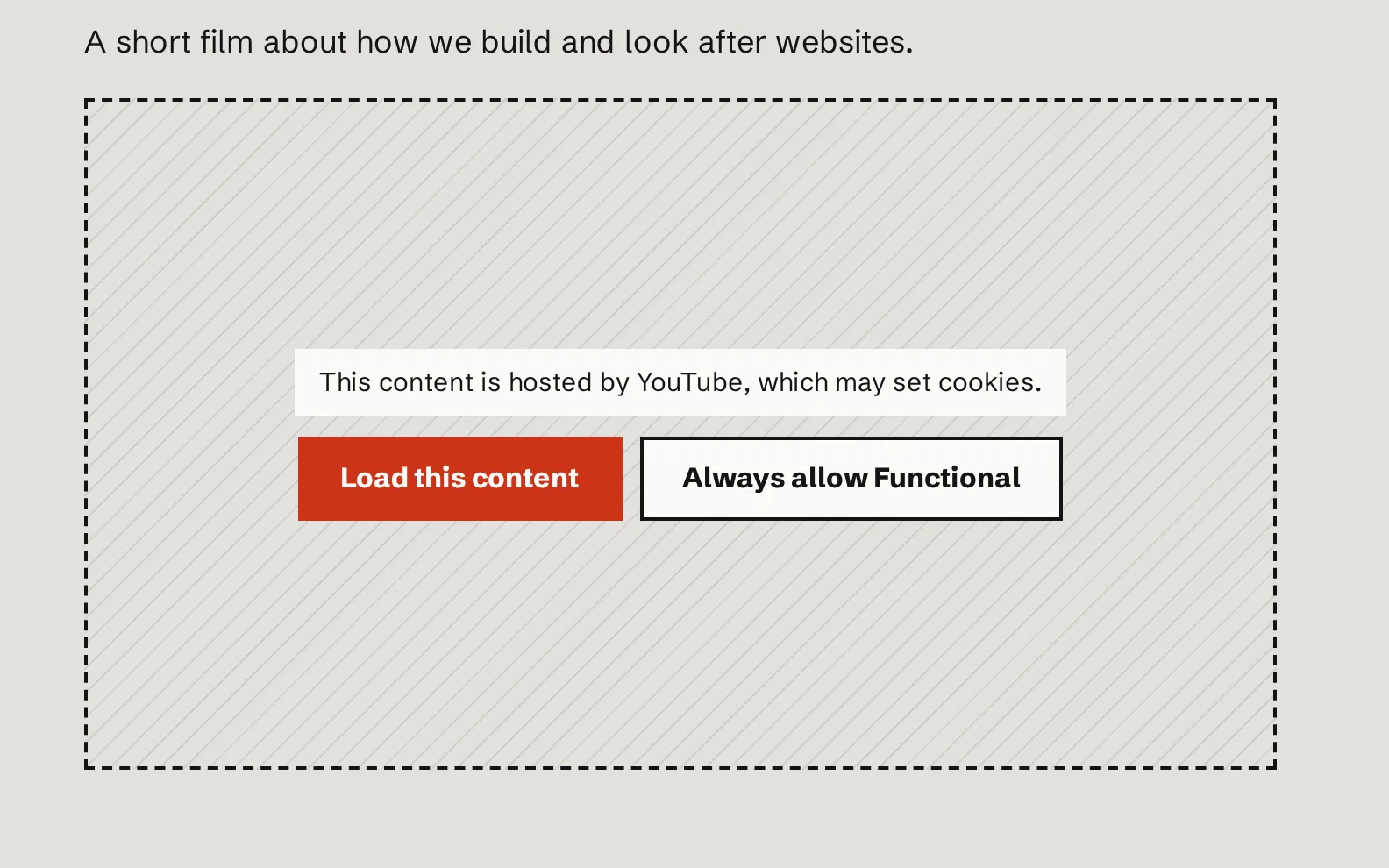
core/embed blocks, iframes in other blocks and iframes in post content are replaced with a placeholder. The original markup is kept inside an inert <template>, so nothing loads.
- Known providers are named in the placeholder: YouTube, Vimeo, Dailymotion, Spotify, SoundCloud, X, Instagram, Facebook, TikTok, Google Maps, OpenStreetMap, Calendly and Typeform.
- Unknown third-party hosts are gated under the provider slug
other, and the placeholder names the host. - Same-site iframes are left alone.
The placeholder offers Load this content (that embed only, nothing stored) and Always allow {category} (saves consent and loads every embed in the category). Its buttons only work inside genuine placeholders, so a look-alike button in post content cannot grant consent.
Google Consent Mode v2
Turn it on under Integrations, or with consent_mode.enabled in code.
A small inline script is printed first in <head> and runs gtag('consent', 'default', …) before any Google tag. Each signal is denied unless the visitor’s stored consent already grants it, so returning visitors start granted without waiting for the runtime. It also sets wait_for_update: 500 and ads_data_redaction. The runtime sends gtag('consent', 'update', …) whenever the choice changes. A signal is granted only when it lists at least one category and the visitor allows every listed one, so an empty mapping stays denied.
- Basic mode: also gate the Google tag’s script handle under
scripts, so nothing loads before consent. - Advanced mode: leave the tag ungated and let Consent Mode send cookieless pings.
Tags hard-coded before wp_head() run before the defaults; move them after it. The snippet is printed with wp_print_inline_script_tag(), so CSP plugins can add nonces through wp_inline_script_attributes.
Global Privacy Control
When the browser sends GPC (navigator.globalPrivacyControl), a notice appears in the banner and dialog, and “Accept all” leaves the gpc_categories off. Visitors can still switch those categories on individually.
WP Consent API
When the WP Consent API plugin is active, the site declares the optin consent type and each choice is mirrored to wp_set_consent() through the wp_consent_api mapping. Plugins that check wp_has_consent() then follow the visitor’s choice.
Letting visitors change their mind
- The floating “Cookie settings” button, on by default.
- The Cookie settings button block, or
[mortar_consent_settings label="…"]. - Any link to
#cookie-settings, such as a menu item, or/cookie-policy/#cookie-settingsfrom other pages.
Cookie declaration
The Cookie declaration block, or [mortar_consent_declaration], lists every category with each cookie’s name, provider, purpose and duration, followed by a cookie settings button. Put it on the cookie policy page.
Consent log
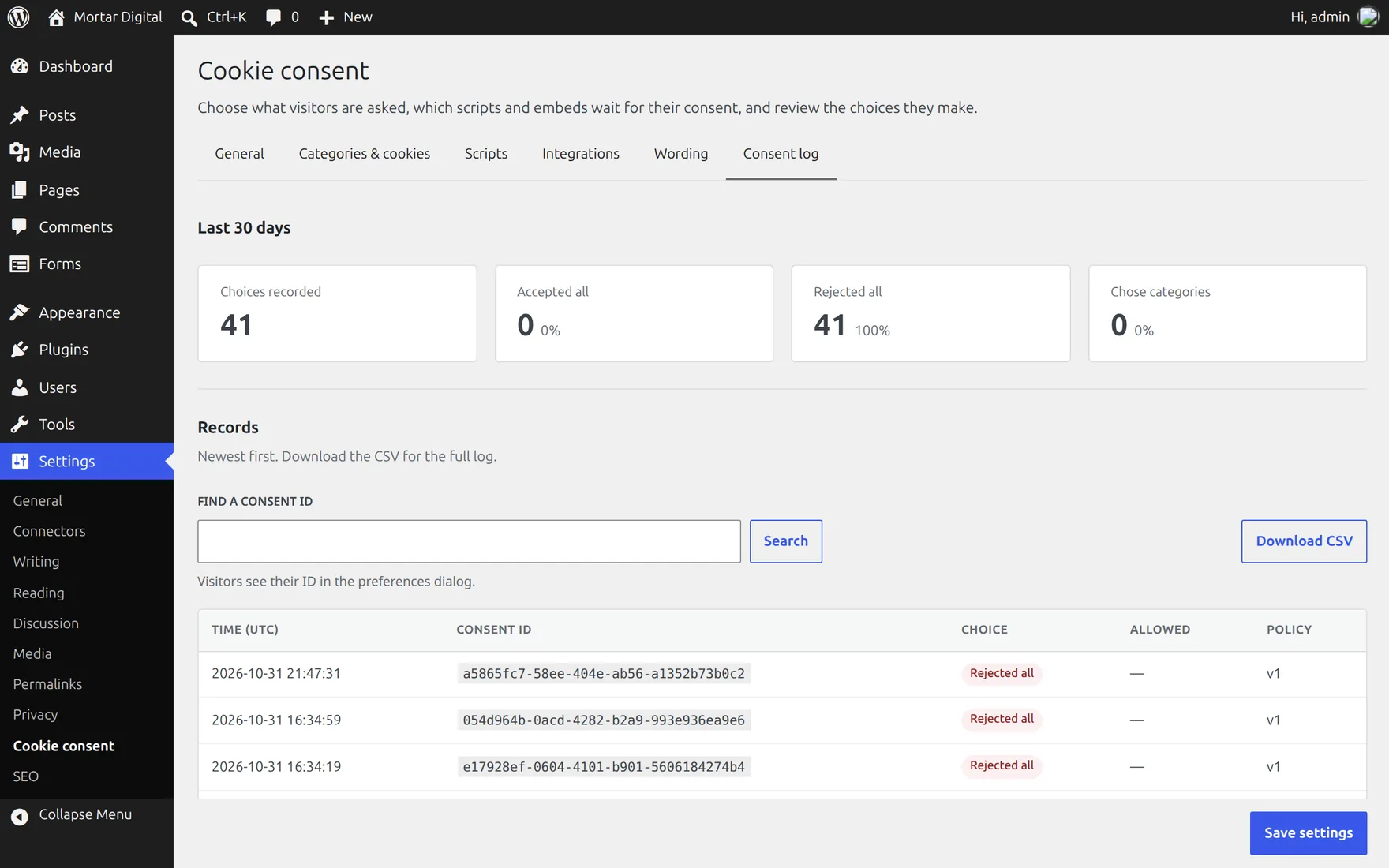
Each choice is sent to POST /wp-json/mortar-consent/v1/records and stored in {prefix}mortar_consent_log: the consent ID (also in the visitor’s cookie and shown in their preferences dialog), the categories allowed, the policy version, how the choice was made and the server time. No IP address, user agent or user ID is stored.
The endpoint is public, because visitors are anonymous. It accepts known fields only, the current policy version and known optional categories, with a 1 KB body limit. It is rate limited to 20 records per client per 10 minutes, plus a site-wide ceiling of 2000 (mortar_consent_rate_limits). Clients are keyed by an HMAC of the IP address, with IPv6 grouped by /64; the address is never stored.
Behind a reverse proxy or load balancer, make sure PHP sees the real client IP, through the web server’s real-IP module or the mortar_consent_client_ip filter. Otherwise every visitor shares one rate-limit bucket.
Because the endpoint is public, anyone can add a record for a made-up consent ID. A record shows that a choice was submitted under that ID and policy version; it does not prove who made it. Admins can see 30-day totals, look up a consent ID and download a CSV from the Consent log tab. The CSV neutralises values that spreadsheets would read as formulas.
Styling
assets/consent.css is scoped under .mortar-consent. Restyle it with custom properties:
.mortar-consent {
    --mortar-consent-bg: var(--wp--preset--color--base);
    --mortar-consent-fg: var(--wp--preset--color--contrast);
    --mortar-consent-button-bg: var(--wp--preset--color--accent-1);
    --mortar-consent-button-fg: var(--wp--preset--color--base);
    --mortar-consent-radius: 4px;
}
The full set is --mortar-consent- followed by bg, fg, muted, border, button-bg, button-fg, focus, radius, shadow, gap, font, banner-width, backdrop and z-index. For full control, return false from mortar_consent_load_styles. Keep the three choice buttons visually equal.
Hooks and API
Filters
| Filter | Receives | Use |
|---|---|---|
mortar_consent_overrides | array | Settings that win over the settings screen and show there read-only. |
mortar_consent_config | array | Final say over the merged configuration. Not reflected in the settings screen. |
mortar_consent_capability | 'manage_options' | Capability for the settings screen, consent log and REST routes. |
mortar_consent_load_styles | true | Return false to drop the fallback stylesheet. |
mortar_consent_rate_limits | ['per_client' => 20, 'global' => 2000] | Consent log limits per 10 minutes. |
mortar_consent_client_ip | string | The client address used for rate limiting. |
PHP
mortar_consent_has('analytics'); // bool, from the visitor's cookieOutput that varies on this cannot be full-page cached, so prefer client-side gating.
JavaScript
window.mortarConsent.has('analytics'); // boolean
window.mortarConsent.get();            // { policyVersion, timestamp, consentId, granted } | null
window.mortarConsent.open();           // open the preferences dialog
window.mortarConsent.acceptAll();
window.mortarConsent.rejectAll();
window.mortarConsent.set(['analytics']); // save a custom choice
document.addEventListener('mortar-consent:change', (e) => e.detail.categories); // { id: boolean }
Uninstalling
Deactivating the plugin clears its cron job. Deleting it keeps the settings and the consent log, which you may need as evidence, unless MORTAR_CONSENT_DELETE_DATA_ON_UNINSTALL is defined as true in wp-config.php. On multisite this applies to every site.
Known limits
- Optimisation plugins that combine or rewrite script tags (for example through
script_loader_tag) can drop thetype="text/plain"gate. Exclude gated handles from them. - Iframes inserted by JavaScript, or lazy-loaded through
data-src, are not detected. - Shared cookie domain: with
cookie_domainset to a parent domain, any subdomain can set the consent cookie. - Capability: whoever holds
mortar_consent_capabilitycontrols what runs on the site. Keep it atmanage_options. - Not legal advice: the plugin does not find trackers by itself. You are responsible for configuring it to match the cookies and services the site uses.
Source and support
Mortar Consent is free software under the GPL-2.0-or-later licence. The source, issues and releases are on GitHub. Please report security issues privately, as described in the repository’s security policy, not in public issues.